Develop code-based scorers
In MLflow Evaluation for GenAI, custom code-based scorers allow you to define flexible evaluation metrics for your AI agent or application.
As you develop scorers, you will often need to iterate quickly. Use this developer workflow to update your scorer without rerunning your entire app each time:
- Define evaluation data
- Generate traces from your app
- Query and store the resulting traces
- As you iterate on your scorer, evaluate using the stored traces
Prerequisites for running the examples
-
Install MLflow and required packages
bashpip install --upgrade mlflow -
Create an MLflow experiment by following the setup your environment quickstart.
-
(Optional, if using OpenAI models) Use the native OpenAI SDK to connect to OpenAI-hosted models. Select a model from the available OpenAI models.
pythonimport mlflow
import os
import openai
# Ensure your OPENAI_API_KEY is set in your environment
# os.environ["OPENAI_API_KEY"] = "<YOUR_API_KEY>" # Uncomment and set if not globally configured
# Enable auto-tracing for OpenAI
mlflow.openai.autolog()
# Create an OpenAI client
client = openai.OpenAI()
# Select an LLM
model_name = "gpt-4o-mini"
-
Create a simple question-answering assistant app for this tutorial:
python@mlflow.trace
def sample_app(messages: list[dict[str, str]]):
# 1. Prepare messages for the LLM
messages_for_llm = [
{"role": "system", "content": "You are a helpful assistant."},
*messages,
]
# 2. Call LLM to generate a response
response = client.chat.completions.create(
model=model_name,
messages=messages_for_llm,
)
return response.choices[0].message.content
sample_app([{"role": "user", "content": "What is the capital of France?"}])
Step 1: Define evaluation data
The evaluation data below is a list of requests for the LLM to answer. For this app, the requests can be simple questions or conversations with multiple messages.
eval_dataset = [
    {
        "inputs": {
            "messages": [
                {"role": "user", "content": "How much does a microwave cost?"},
            ]
        },
    },
    {
        "inputs": {
            "messages": [
                {
                    "role": "user",
                    "content": "Can I return the microwave I bought 2 months ago?",
                },
            ]
        },
    },
    {
        "inputs": {
            "messages": [
                {
                    "role": "user",
                    "content": "I'm having trouble with my account.  I can't log in.",
                },
                {
                    "role": "assistant",
                    "content": "I'm sorry to hear that you're having trouble with your account.  Are you using our website or mobile app?",
                },
                {"role": "user", "content": "Website"},
            ]
        },
    },
]
Step 2: Generate traces from your app
Use mlflow.genai.evaluate() to generate traces from the app. Since evaluate() requires at least one scorer, define a placeholder scorer for this initial trace generation:
from mlflow.genai.scorers import scorer


@scorer
def placeholder_metric() -> int:
    # placeholder return value
    return 1
Run evaluation using the placeholder scorer:
eval_results = mlflow.genai.evaluate(
    data=eval_dataset, predict_fn=sample_app, scorers=[placeholder_metric]
)
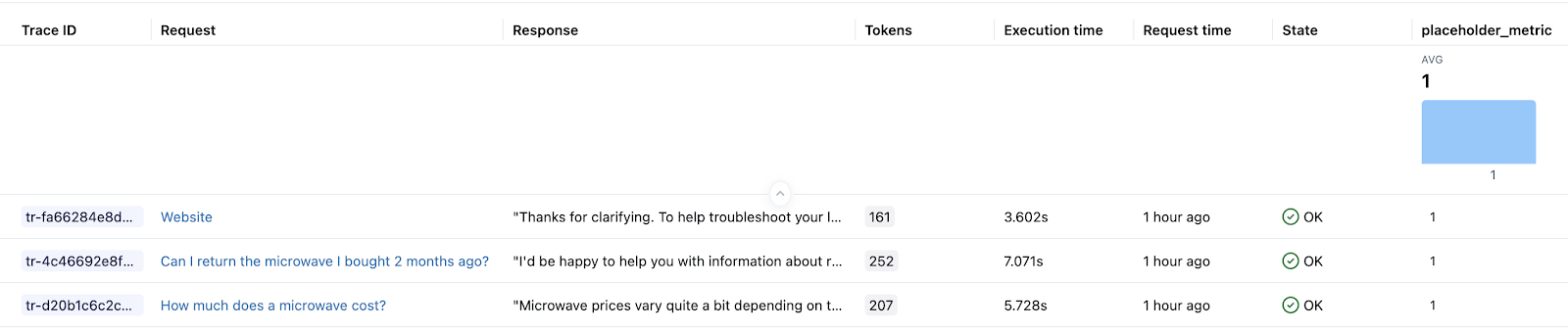
After running the above code, you should have one trace in your experiment for each row in your evaluation dataset. Databricks Notebooks also display trace visualizations as part of cell results. The LLM's response generated by the sample_app during evaluation appears in the notebook Trace UI's Outputs field and in the MLflow Experiment UI's Response column.
Step 3: Query and store the resulting traces
Store the generated traces in a local variable. The mlflow.search_traces() function returns a Pandas DataFrame of traces.
generated_traces = mlflow.search_traces(run_id=eval_results.run_id)
generated_traces
Step 4: As you iterate on your scorer, call evaluate() using the stored traces
Pass the Pandas DataFrame of traces directly to evaluate() as an input dataset. This allows you to quickly iterate on your metric without having to re-run your app. The code below runs a new scorer on the precomputed generated_traces.
from mlflow.genai.scorers import scorer


@scorer
def response_length(outputs: str) -> int:
    # Example metric.
    # Implement your actual metric logic here.
    return len(outputs)


# Note the lack of a predict_fn parameter.
mlflow.genai.evaluate(
    data=generated_traces,
    scorers=[response_length],
)