Tracing LiveKit Agents
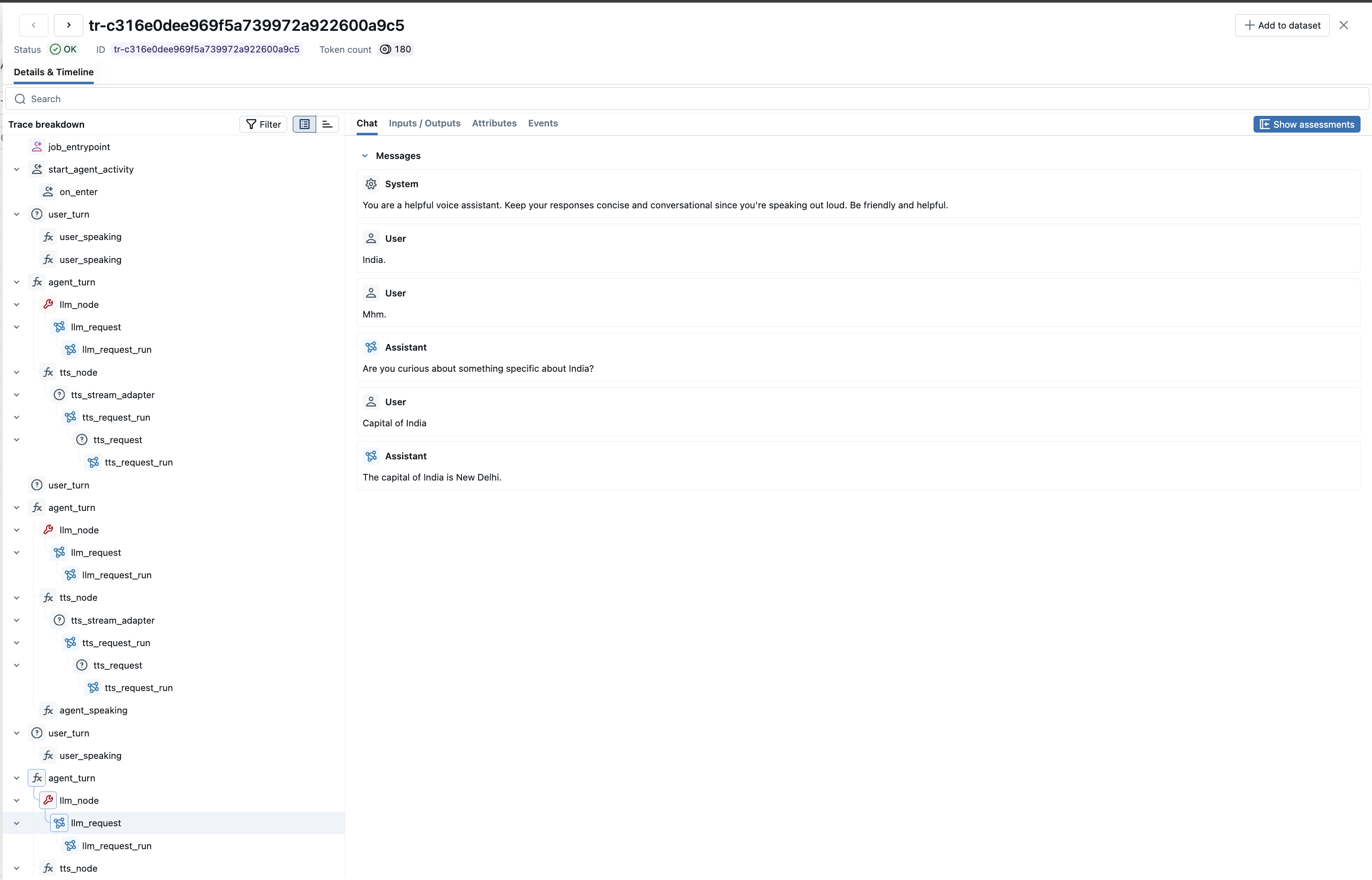
MLflow Tracing provides automatic tracing capability for LiveKit Agents, an open-source framework for building real-time multimodal AI applications. MLflow supports tracing for LiveKit Agents through the OpenTelemetry integration.
LiveKit Agents is a framework for building real-time, multimodal AI applications. It enables developers to create voice-enabled AI assistants that can:
- Process speech-to-text (STT) in real-time
- Generate responses using LLMs (OpenAI, Anthropic, etc.)
- Convert text to speech (TTS) with natural voices
- Handle voice activity detection (VAD)
- Execute tools and function calls
Step 1: Install Libraries
Install the required packages for LiveKit Agents with OpenTelemetry support:
pip install livekit-agents livekit-plugins-openai livekit-plugins-silero
Step 2: Start the MLflow Tracking Server
Start the MLflow Tracking Server with a SQL-based backend store:
mlflow server --port 5000
This example uses SQLite as the backend store. To use other types of SQL databases such as PostgreSQL, MySQL, and MSSQL, change the store URI as described in the backend store documentation. OpenTelemetry ingestion is not supported with file-based backend stores.
Step 3: Set Environment Variables
Configure OpenTelemetry and LiveKit credentials:
export OTEL_EXPORTER_OTLP_ENDPOINT=http://localhost:5000
export OTEL_EXPORTER_OTLP_HEADERS=x-mlflow-experiment-id=0
export OTEL_SERVICE_NAME=livekit-voice-agent

# LiveKit Cloud credentials (get free at https://cloud.livekit.io)
export LIVEKIT_URL=wss://your-project.livekit.cloud
export LIVEKIT_API_KEY=your-api-key
export LIVEKIT_API_SECRET=your-api-secret

# LLM provider
export OPENAI_API_KEY=your-openai-api-key
x-mlflow-experiment-idThe x-mlflow-experiment-id header tells MLflow which experiment to associate the traces with. You can use 0 for the default experiment, or specify a custom experiment ID. To create a new experiment and get its ID, run:
mlflow experiments create --experiment-name "my-livekit-experiment"
This will output the experiment ID which you can use in the header.
LiveKit Cloud offers a free tier with no credit card required. Sign up to get your LIVEKIT_URL, LIVEKIT_API_KEY, and LIVEKIT_API_SECRET.
Step 4: Create Your Voice Agent
Create a voice agent with automatic MLflow tracing. All tracing is handled automatically by LiveKit's built-in OpenTelemetry instrumentation - no manual span creation required.
# voice_agent.py
import os
import logging

from livekit.agents import JobContext, JobProcess, WorkerOptions, cli
from livekit.agents.voice import Agent, AgentSession
from livekit.agents.telemetry import set_tracer_provider
from livekit.plugins import openai, silero

from opentelemetry import trace
from opentelemetry.sdk.trace import TracerProvider
from opentelemetry.sdk.trace.export import BatchSpanProcessor
from opentelemetry.exporter.otlp.proto.http.trace_exporter import OTLPSpanExporter
from opentelemetry.sdk.resources import Resource, SERVICE_NAME

logging.basicConfig(level=logging.INFO)
logger = logging.getLogger("voice-agent")


def configure_mlflow_tracing():
    """Configure OpenTelemetry to send traces to MLflow."""
    if not os.getenv("OTEL_EXPORTER_OTLP_ENDPOINT"):
        logger.warning("OTEL_EXPORTER_OTLP_ENDPOINT not set, tracing disabled")
        return None

    service_name = os.getenv("OTEL_SERVICE_NAME", "livekit-voice-agent")
    resource = Resource.create({SERVICE_NAME: service_name})

    provider = TracerProvider(resource=resource)
    provider.add_span_processor(BatchSpanProcessor(OTLPSpanExporter()))

    # Set both global and LiveKit tracer provider
    trace.set_tracer_provider(provider)
    set_tracer_provider(provider)

    logger.info("MLflow tracing configured successfully!")
    return provider


async def entrypoint(ctx: JobContext) -> None:
    """Main entrypoint for the agent."""
    logger.info(f"Agent starting for room: {ctx.room.name}")

    # Connect to the room
    await ctx.connect()

    # Create the voice agent with all components
    agent = Agent(
        instructions="""You are a helpful voice assistant. Keep your responses
        concise and conversational since you're speaking out loud.
        Be friendly and helpful.""",
        vad=silero.VAD.load(),  # Voice Activity Detection
        stt=openai.STT(),  # Speech-to-Text (Whisper)
        llm=openai.LLM(model="gpt-4o-mini"),  # Language Model
        tts=openai.TTS(voice="alloy"),  # Text-to-Speech
    )

    # Create and start the agent session
    session = AgentSession()
    await session.start(agent, room=ctx.room)

    logger.info("Agent session started! Ready for conversation.")


def prewarm(proc: JobProcess) -> None:
    """Prewarm function to load models before handling requests."""
    # Configure tracing before anything else
    configure_mlflow_tracing()

    # Preload Silero VAD model for faster startup
    proc.userdata["vad"] = silero.VAD.load()
    logger.info("Prewarmed VAD model")


if __name__ == "__main__":
    cli.run_app(
        WorkerOptions(
            entrypoint_fnc=entrypoint,
            prewarm_fnc=prewarm,
        )
    )
Step 5: Run the Agent
Start your LiveKit agent:
# Run in dev mode
python voice_agent.py dev
Once the agent is running and registered, connect to it using the LiveKit Agents Playground.
Step 6: View Traces in MLflow
After having a conversation with your agent, open the MLflow UI at http://localhost:5000 and navigate to the Traces tab.
You will see detailed traces showing:
- Agent Session: The overall session containing all interactions
- User Turns: Each user speech input with transcriptions
- Agent Turns: Each agent response including LLM and TTS processing
- LLM Requests: Full message history with inputs/outputs and token usage
- STT Processing: Speech-to-text transcriptions
- TTS Synthesis: Text-to-speech generation
The Chat tab provides a clean conversation view showing the full dialogue between user and assistant.
LLM-Only Example (No LiveKit Server Required)
For quick testing without a LiveKit server, you can use LiveKit's LLM plugin directly:
# livekit_llm_example.py
import os
import asyncio

from opentelemetry import trace
from opentelemetry.sdk.trace import TracerProvider
from opentelemetry.sdk.trace.export import BatchSpanProcessor
from opentelemetry.exporter.otlp.proto.http.trace_exporter import OTLPSpanExporter
from opentelemetry.sdk.resources import Resource, SERVICE_NAME

from livekit.agents.telemetry import set_tracer_provider
from livekit.agents.llm import ChatContext
from livekit.plugins.openai import LLM


def configure_tracing():
    endpoint = os.getenv("OTEL_EXPORTER_OTLP_ENDPOINT")
    if not endpoint:
        print("ERROR: OTEL_EXPORTER_OTLP_ENDPOINT not set!")
        return None

    headers_str = os.getenv("OTEL_EXPORTER_OTLP_HEADERS", "")
    headers = {}
    if headers_str:
        for item in headers_str.split(","):
            if "=" in item:
                key, value = item.split("=", 1)
                headers[key.strip()] = value.strip()

    service_name = os.getenv("OTEL_SERVICE_NAME", "livekit-agent")
    resource = Resource.create({SERVICE_NAME: service_name})
    exporter = OTLPSpanExporter(endpoint=endpoint, headers=headers if headers else None)

    provider = TracerProvider(resource=resource)
    provider.add_span_processor(BatchSpanProcessor(exporter))

    trace.set_tracer_provider(provider)
    set_tracer_provider(provider)
    return provider


async def main():
    provider = configure_tracing()
    if not provider:
        return

    # Create LLM instance - traces are created AUTOMATICALLY
    llm = LLM(model="gpt-4o-mini")

    chat_ctx = ChatContext()
    chat_ctx.add_message(role="system", content="You are a helpful assistant.")
    chat_ctx.add_message(role="user", content="What is the capital of France?")

    print("User: What is the capital of France?")

    # This call automatically generates traces
    stream = llm.chat(chat_ctx=chat_ctx)

    response = ""
    async for chunk in stream:
        if chunk.delta and chunk.delta.content:
            response += chunk.delta.content

    await stream.aclose()
    print(f"Assistant: {response}")

    await llm.aclose()
    provider.force_flush()
    provider.shutdown()

    print("\nCheck MLflow UI for traces!")


if __name__ == "__main__":
    asyncio.run(main())
Run with:
export OTEL_EXPORTER_OTLP_ENDPOINT=http://localhost:5000
export OTEL_EXPORTER_OTLP_HEADERS=x-mlflow-experiment-id=0
export OPENAI_API_KEY=your-key

python livekit_llm_example.py
Troubleshooting
Traces Not Appearing in MLflow
- Check backend store: Ensure MLflow is using a SQL backend, not file-based storage
- Verify endpoint: Confirm the MLflow server is running and accessible at the configured endpoint
- Check headers: Ensure the experiment ID header is correctly set
- Flush traces: Call
provider.force_flush()before shutdown to ensure all traces are exported
Agent Not Responding
- Check LiveKit credentials: Verify
LIVEKIT_URL,LIVEKIT_API_KEY, andLIVEKIT_API_SECRETare set correctly - Check agent registration: Look for "registered worker" in the agent logs
- Kill orphan processes: LiveKit agents spawn child processes. If you stop the parent, kill child processes too:
pkill -f "multiprocessing.spawn"
Missing Conversation Content
Ensure you're using the latest version of livekit-agents. The GenAI events (gen_ai.system.message, gen_ai.user.message, gen_ai.assistant.message, gen_ai.choice) are automatically captured and displayed in MLflow's Chat UI.
Next Steps
Evaluate the Agent
Learn how to evaluate the agent's performance with LLM judges.
Manage Prompts
Learn how to manage prompts with MLflow's prompt registry.
Automatic Agent Optimization
Automatically optimize the agent end-to-end with state-of-the-art algorithms.