Tracing MLflow AI Gateway
MLflow AI Gateway is a unified, centralized interface for accessing multiple LLM providers. It simplifies API key management, provides a consistent API across providers, and enables seamless switching between models from OpenAI, Anthropic, Google, and other providers.
Since MLflow AI Gateway exposes an OpenAI-compatible API, you can use MLflow's automatic tracing integrations to capture detailed traces of your LLM interactions.
Integration Options
There are two ways to trace LLM calls through MLflow AI Gateway:
| Approach | Description | Best For |
|---|---|---|
| Server-side Tracing (Coming Soon) | Gateway automatically logs all requests | Centralized tracing for all requests through the gateway |
| Client-side Tracing | Use OpenAI SDK with MLflow autolog | Combining LLM traces with your agent or application traces |
Server-side tracing for MLflow AI Gateway is not available yet. Stay tuned for updates!
Prerequisite
Start MLflow Server with AI Gateway
To start MLflow server with AI Gateway, you need to install the mlflow[genai] package.
pip install mlflow[genai]
Then start the MLflow server as usual, no additional configuration is needed.
mlflow server
Create Endpoint
Create an endpoint in MLflow AI Gateway to route requests to your LLM provider. See the AI Gateway Quickstart for detailed setup instructions.
Query Gateway
You can trace LLM calls through MLflow AI Gateway using any of the following approaches:
- OpenAI SDK
- Anthropic SDK
- Gemini SDK
- LangChain
Since MLflow AI Gateway exposes an OpenAI-compatible API, you can use MLflow's OpenAI automatic tracing integration to trace calls.
import mlflow
from openai import OpenAI

# Enable auto-tracing for OpenAI
mlflow.openai.autolog()

# Set MLflow tracking URI and experiment
mlflow.set_tracking_uri("http://localhost:5000")
mlflow.set_experiment("MLflow AI Gateway")

# Point OpenAI client to MLflow AI Gateway
client = OpenAI(
    base_url="http://localhost:5000/gateway/openai/v1",
    api_key="dummy",  # API key not needed, configured server-side
)

response = client.chat.completions.create(
    model="my-endpoint", messages=[{"role": "user", "content": "Hello!"}]
)
print(response.choices[0].message.content)
You can use MLflow's Anthropic automatic tracing integration to trace calls through MLflow AI Gateway.
import mlflow
import anthropic

# Enable auto-tracing for Anthropic
mlflow.anthropic.autolog()

# Set MLflow tracking URI and experiment
mlflow.set_tracking_uri("http://localhost:5000")
mlflow.set_experiment("MLflow AI Gateway")

# Point Anthropic client to MLflow AI Gateway
client = anthropic.Anthropic(
    base_url="http://localhost:5000/gateway/anthropic",
    api_key="dummy",  # API key not needed, configured server-side
)

# Make API calls - traces will be captured automatically
response = client.messages.create(
    max_tokens=1004,
    model="<your-endpoint-name>",  # Use your endpoint name
    messages=[{"role": "user", "content": "Hello world"}],
)
print(response.content[0].text)
You can use MLflow's Gemini automatic tracing integration to trace calls through MLflow AI Gateway.
import mlflow
from google import genai

# Enable auto-tracing for Gemini
mlflow.gemini.autolog()

# Set MLflow tracking URI and experiment
mlflow.set_tracking_uri("http://localhost:5000")
mlflow.set_experiment("MLflow AI Gateway")

# Point Gemini client to MLflow AI Gateway
client = genai.Client(
    http_options={"base_url": "http://localhost:5000/gateway/gemini"},
    api_key="dummy",  # API key not needed, configured server-side
)

# Make API calls - traces will be captured automatically
response = client.models.generate_content(
    model="<your-endpoint-name>",  # Use your endpoint name
    contents={"text": "Hello!"},
)
print(response.text)
You can use MLflow's LangChain automatic tracing integration to trace calls through MLflow AI Gateway.
import mlflow
from langchain.agents import create_agent
from langchain_openai import ChatOpenAI

# Enable auto-tracing for LangChain
mlflow.langchain.autolog()

# Set MLflow tracking URI and experiment
mlflow.set_tracking_uri("http://localhost:5000")
mlflow.set_experiment("MLflow AI Gateway")

# Point LangChain to MLflow AI Gateway
llm = ChatOpenAI(
    base_url="http://localhost:5000/gateway/mlflow/v1",
    model="<your-endpoint-name>",  # Use your endpoint name
    api_key="dummy",  # API key not needed, configured server-side
)


def get_weather(city: str) -> str:
    """Get weather for a given city."""
    return f"It's always sunny in {city}!"


# Run the agent as usual
agent = create_agent(
    llm,
    tools=[get_weather],
    system_prompt="You are a helpful assistant",
)
agent.invoke({"input": "What's the weather in San Francisco?"})
View Traces in MLflow UI
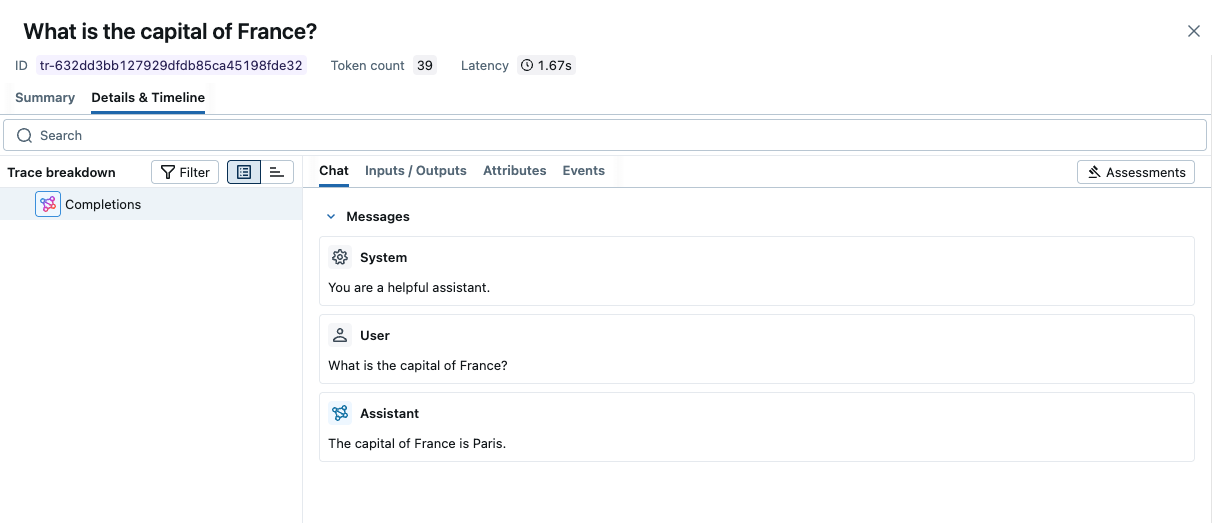
Open the MLflow UI at http://localhost:5000 (or your custom MLflow server URL) to see the traces from your MLflow AI Gateway calls.
Next Steps
Track User Feedback
Record user feedback on traces for tracking user satisfaction.
Manage Prompts
Learn how to manage prompts with MLflow's prompt registry.
Evaluate Traces
Evaluate traces with LLM judges to understand and improve your AI application's behavior.